

Design & illustration
Alpha / v0.24.1SVG Editor Online
VectorCraft · Free online vector editor
Open an SVG in your browser, edit paths, shapes, and text, then export a copy. Free with no account. After importing, check that the paths you need are editable.
Desktop browser recommended. The editor downloads on first use; loading time depends on your connection and device.
In your toolkit
- 01
Paths & shape tools
- 02
Gradients & typography
- 03
SVG and PDF workflows
- Works with
- SVG / PDF / EPS
- Web release
- v0.24.1 · Alpha
- Open in your browser
- Free to use. No account needed.
Before you start
Alpha. Illustrator editing data, some raster effects, and advanced 3D workflows are incomplete.
Save or export before closing the editor.
Release notes & downloadsLicense & attribution
The editors use MIT / Apache-2.0 licensing; bundled assets retain their own licenses. See the source, release and license files below.
What can I edit with this tool?
VectorCraft — Free online vector editor. Create editable paths, shapes and text for icons or illustrations, with SVG and PDF workflows. Free in your browser, with no account. Import fidelity varies.
This site hosts a pinned browser release. The upstream project also has desktop and automation interfaces, and its README may describe changes after this release. The project labels itself alpha and distinguishes feature breadth from readiness for real work. Treat the page as a useful place to learn the workflow and make test artwork, while checking output before handing it to another application.
Which tasks does it support?
Precise path construction
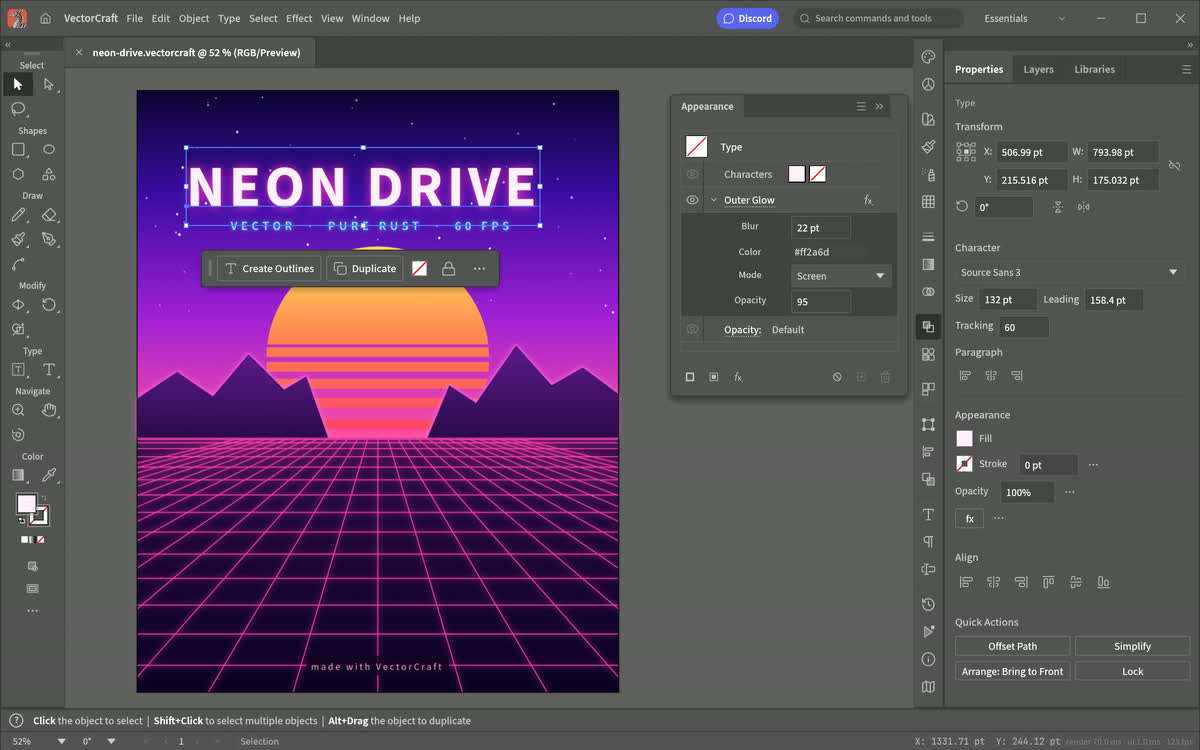
The README shows Bézier anchors and handles, Pen and Direct Selection editing, Pathfinder operations, Shape Builder, and smart guides. These let you draw a silhouette, revise its curve, combine shapes, and align the result without repainting every pixel. Keep key paths editable while exploring alternatives.
Appearance without flattening
Layers, clipping masks, live blends, gradients, type, transparency, and effects can be combined in a single artwork. The upstream examples include multiple artboards and editable effects. This makes it possible to test a color or layout change while preserving the underlying vector construction.
Open and export formats
The README calls SVG a first-class format and describes PDF and PDF-compatible AI exchange, a native JSON-based project format, and bitmap exports including PNG, JPEG, and WebP. Format support differs in depth. An exported preview can look right even when another editor does not preserve every editable object.
Documented project status
The upstream Status section explains what is already usable and points to a roadmap and a ranked gaps list. Its examples are produced through the project command API, which also supports agent workflows. Those automation capabilities belong to the wider project and may not all be available in the hosted browser view.
How do I edit and save a file?
- Launch VectorCraft in the browser and start with a new artboard or a disposable example. Check the drawing controls and layer list before importing important artwork.
- Draw one shape with the Pen or a shape tool. Adjust its anchors with Direct Selection, then try a fill, stroke, or gradient while keeping the path editable.
- Build a second object and use a layer, group, clipping mask, or Pathfinder operation to control how the pieces relate. For a layout, compare the appearance on more than one artboard.
- Save the native project and export a format needed elsewhere, such as SVG or PDF. Reopen the exported file in the intended destination and inspect text, gradients, masks, and object structure instead of assuming identical editability.
Questions about using this editor
Can I use Get Artcraft for free without signing up?
Yes. All 12 editors are currently free to use, with no account, subscription or installation required. AI generation and paid third-party services are not included.
Where are my files saved?
Save or export your files to your own device. The editors process files in your browser, and this site does not provide cloud file storage. Some editors keep local recovery data; that is not a substitute for an exported copy.
Can I use the editors on a phone?
A desktop browser is recommended. Use a browser with WebAssembly and WebGPU or WebGL2 support, plus a keyboard and mouse. You can try opening an editor on a phone, but its controls and graphics may not work on your device.
Is this a bitmap painting app?
Its main job is editable vector drawing. The README also lists raster import and output paths, but tools such as Bézier paths, artboards, gradients, typography, and SVG exchange are the center of the workflow. Use PhotoCraft for a primarily pixel-based image edit.
Can it replace an Illustrator project without checking?
No. The README describes strong coverage of everyday illustration while still labeling the project alpha. PDF-compatible AI and other imported formats can vary in fidelity. Test a copy, compare the render, and confirm the objects you need remain editable.
Where are the detailed compatibility notes?
The linked upstream repository contains a Status section, roadmap, parity assessment, and gaps document. Check those against the version displayed here because ongoing development can change which limitations apply to a later build.
What are the current limits?
VectorCraft remains alpha. The README describes incomplete depth in some effects and format workflows even where a menu item exists. Compatibility with complex Illustrator editing data, raster effects, and advanced 3D is not guaranteed. The hosted web build also depends on your browser and graphics support. Preserve source files, inspect every export, and use the upstream release notes for decisions involving client-ready artwork.


Desktop browser recommended. The editor downloads on first use; loading time depends on your connection and device.
Open VectorCraft