

Documents
Alpha / v0.19.1GridCraft.
Free online spreadsheet editor
Open XLSX or CSV data, edit cells and formulas, then save your spreadsheet. Free with no account. Check calculations and workbook formatting after export.
Desktop browser recommended. The editor downloads on first use; loading time depends on your connection and device.
In your toolkit
- 01
Spreadsheet workspace
- 02
Cell formulas
- 03
Tabular data
- Works with
- XLSX / CSV
- Web release
- v0.19.1 · Alpha
- Open in your browser
- Free to use. No account needed.
Before you start
Alpha. Formula and file compatibility are still evolving; verify results before relying on complex calculations.
Save or export before closing the editor.
Release notes & downloadsLicense & attribution
The editors use MIT / Apache-2.0 licensing; bundled assets retain their own licenses. See the source, release and license files below.
What can I edit with this tool?
GridCraft — Free online spreadsheet editor. Open XLSX or CSV data, edit cells and formulas, then save your spreadsheet. Free with no account. Check calculations and workbook formatting after export.
The project uses XLSX as its main workbook format and also handles CSV and TSV. Its README calls GridCraft alpha: common workflows exist, but file fidelity and deep compatibility are still developing. Treat the result of a formula or import as something to check, especially if the workbook will inform an important decision.
Which tasks does it support?
A recognizable grid
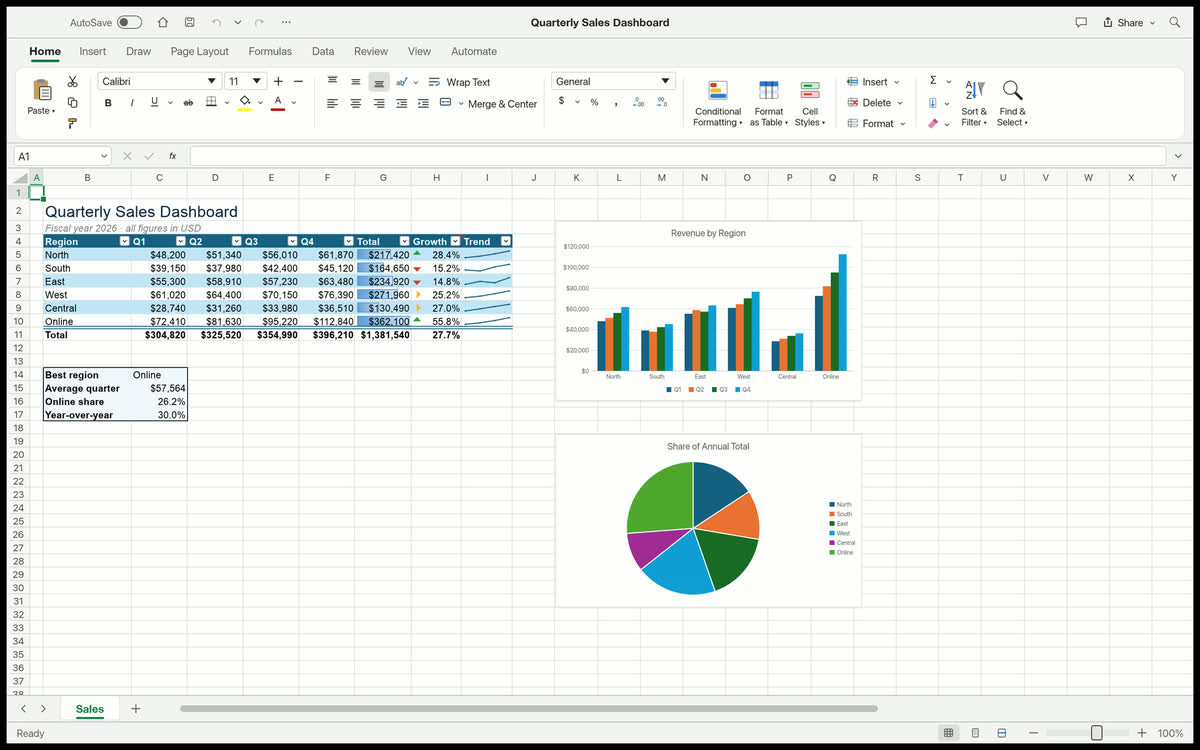
The ribbon, Name Box, formula bar, tabs, fill handle, Paste Special, Format Cells, and colored formula references provide a familiar way to move through a workbook. You can select a range, apply number formatting, fill a pattern, and inspect formulas without switching to a separate programming interface.
Calculation and analysis
The README describes a dependency-graph calculation engine, dynamic arrays and spilling, hundreds of worksheet functions, structured references, sorting, filters, data validation, and subtotals. These are useful for exploring data and building a small model, while still requiring answer checks against known cases.
Tables and visual output
GridCraft's documented workbook features include tables, conditional formats, comments, hyperlinks, charts, pictures, sparklines, and print settings. A chart can help explain a range; a conditional format can reveal a pattern. The output should still be inspected after a cross-application round trip.
Several file paths
The README says XLSX read and write include many workbook structures. CSV and TSV are simpler exchange formats, while older XLS, XLSB, and ODS support is more limited on import. Choose an exchange format that preserves the specific formulas, styles, and objects you need, not just one that opens.
How do I edit and save a file?
- Launch GridCraft and open a sample or a small copy of a workbook. Identify the sheets, formula bar, and any data validation before making changes.
- Enter a short table with values whose totals you know. Add one formula, fill it down, and compare the results with a manual calculation or another trusted spreadsheet.
- Try a sort, filter, table style, or chart. If you use dynamic arrays, inspect the cells they spill into and check how references change after an edit.
- Save the workbook and reopen it in the application that will consume it. Compare formula results, number formats, charts, validations, and print layout. Export CSV only when losing workbook structure is acceptable.
Questions about using this editor
Can I use Get Artcraft for free without signing up?
Yes. All 12 editors are currently free to use, with no account, subscription or installation required. AI generation and paid third-party services are not included.
Where are my files saved?
Save or export your files to your own device. The editors process files in your browser, and this site does not provide cloud file storage. Some editors keep local recovery data; that is not a substitute for an exported copy.
Can I use the editors on a phone?
A desktop browser is recommended. Use a browser with WebAssembly and WebGPU or WebGL2 support, plus a keyboard and mouse. You can try opening an editor on a phone, but its controls and graphics may not work on your device.
Can it open an Excel workbook?
The README lists XLSX as the native working format and describes importing older XLS files with a narrower set of preserved information. A workbook opening successfully is not proof that every formula, chart, or object round-trips. Compare a copy in both applications.
Are complex formulas safe for high-stakes calculations?
GridCraft documents many functions and a calculation engine, but its alpha roadmap still calls out XLSX fidelity, very large workbooks, calculation depth, and chart work. Validate critical results independently and retain the original workbook.
What happens with CSV?
CSV is a tabular exchange format, not a full workbook. It does not retain sheets, most formatting, charts, and formula structures. The README lists CSV and TSV support, but choose XLSX when those workbook features matter and verify the saved file.
What are the current limits?
GridCraft is alpha. The pinned README names real-world XLSX fidelity, very large workbooks, chart depth, full script coverage, and older XLS import as ongoing work. XLSB and ODS imports use saved values rather than full formula reconstruction in documented paths. Browser memory and file size add practical limits. Check calculations with known examples, compare round trips, and do not make important financial or scientific decisions from an unverified sheet.



Desktop browser recommended. The editor downloads on first use; loading time depends on your connection and device.
Open GridCraft