

Audio
Pre-alpha / v0.20.1WAV Editor Online
SoundCraft · Free online audio editor
Open a WAV file in your browser, trim a clip, and export the result as WAV. Free with no account. SoundCraft is pre-alpha and may ask for audio permissions.
Desktop browser recommended. The editor downloads on first use; loading time depends on your connection and device.
In your toolkit
- 01
Audio workspace
- 02
Editing & arrangement
- 03
Sound production
- Works with
- WAV / Audio
- Web release
- v0.20.1 · Pre-alpha
- Open in your browser
- Free to use. No account needed.
Before you start
Pre-alpha. Browser audio permissions and supported formats vary. Desktop plug-ins are not available in this web build.
Save or export before closing the editor.
Release notes & downloadsLicense & attribution
The editors use MIT / Apache-2.0 licensing; bundled assets retain their own licenses. See the source, release and license files below.
What can I edit with this tool?
SoundCraft — Free online audio editor. Record or import audio, arrange tracks and mix a session in your browser. Free with no account. This pre-alpha build depends on browser audio permissions; desktop plug-ins do not run here.
The README labels SoundCraft pre-alpha. It says the basic record-to-bounce path exists, while several parts of a professional session workflow remain unfinished. Treat a short demo or disposable project as the right first experiment. Keep original recordings and an independent final bounce rather than relying on a single project copy.
Which tasks does it support?
Edit and arrange tracks
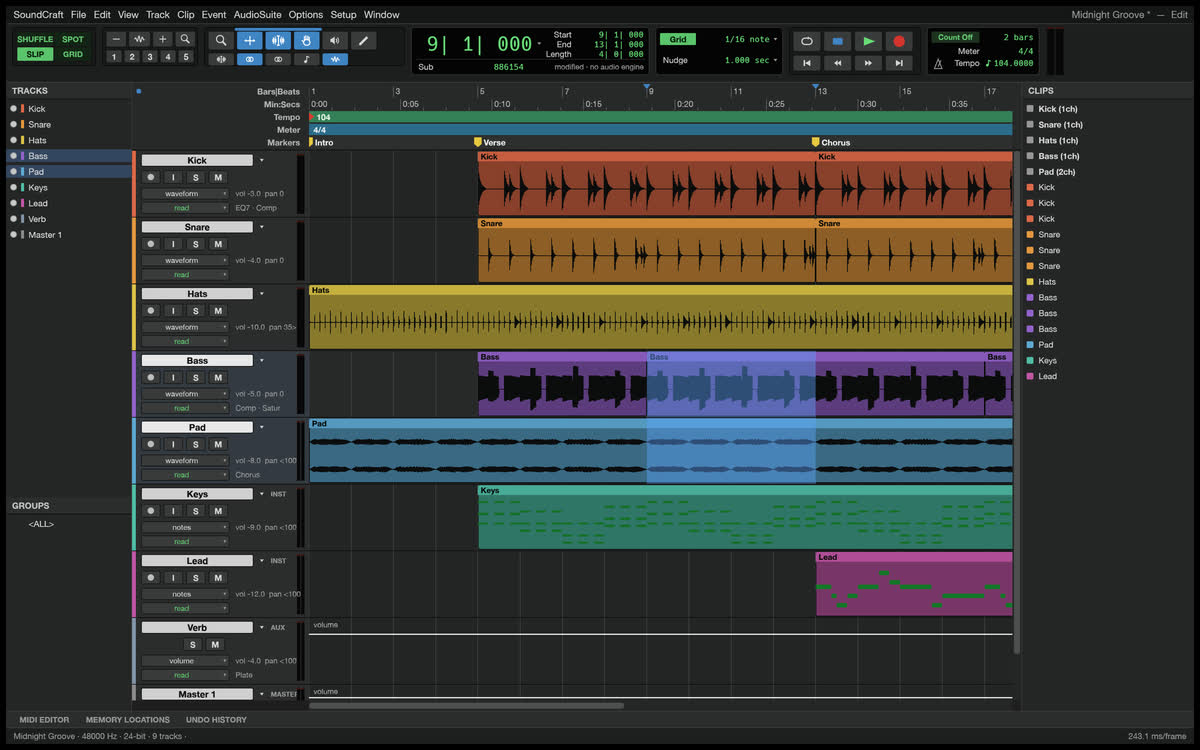
The README describes multiple edit modes and tools, clips, fades, crossfades, playlists, markers, comping lanes, and undo. You can separate a clip, move material on the timeline, and audition the transition before changing the balance of the whole session.
Mixing and processing
The Mix window includes channel strips, faders, pan, inserts, sends, buses, aux inputs, master faders, and meters. Built-in processing in the upstream project includes EQ, compression, reverb, delay, and other effects. Automation can record changes to volume, pan, sends, and plug-in parameters over time.
MIDI and notation
Instrument and MIDI tracks, a piano-roll editor, velocity editing, quantization, and Standard MIDI File exchange are documented in the README. The project also describes a score view and MusicXML export. These features are part of the wider DAW and may need version-specific checking in this web build.
A wider production workspace
The upstream README covers recording, bouncing, a video picture track, surround formats, and desktop plug-in standards. Native CLAP, VST3, and Audio Unit hosting belongs to desktop environments; it should not be assumed available inside this browser release. Focus first on the controls and formats visible in the hosted editor.
How do I edit and save a file?
- Launch SoundCraft and allow any browser audio permission that your chosen task needs. Start with its demo session or a short recording that you can replace, and confirm that playback works before editing.
- Inspect the Edit window. Make a small cut or fade, then play the transition while watching levels. Keep the source recording unchanged until you are satisfied with the result.
- Open the Mix window, adjust a fader or pan, and add one built-in processor if available. Compare bypassed and processed playback so a louder signal is not mistaken for a better mix.
- Bounce a short segment to a supported output and play it outside SoundCraft. Check start and end, channels, timing, and level. Save any project copy the browser offers before closing the tab.
Questions about using this editor
Can I use Get Artcraft for free without signing up?
Yes. All 12 editors are currently free to use, with no account, subscription or installation required. AI generation and paid third-party services are not included.
Where are my files saved?
Save or export your files to your own device. The editors process files in your browser, and this site does not provide cloud file storage. Some editors keep local recovery data; that is not a substitute for an exported copy.
Can I use the editors on a phone?
A desktop browser is recommended. Use a browser with WebAssembly and WebGPU or WebGL2 support, plus a keyboard and mouse. You can try opening an editor on a phone, but its controls and graphics may not work on your device.
Can I use my desktop VST or Audio Unit plug-ins here?
Do not assume so. The upstream README documents native plug-in support in the wider application, but a browser build cannot load ordinary desktop plug-in binaries. Use the web release's visible built-in tools and consult the upstream desktop release if plug-in hosting is essential.
Can I record MIDI from a controller?
The pinned README's pre-alpha status specifically lists MIDI controller recording as unfinished. MIDI editing and file exchange are separate features. Test the exact input path you need before planning a session around it.
Is this ready for a studio handoff?
Not as a general replacement for a mature DAW. The upstream status lists missing interface and buffer selection and AAF/OMF interchange, among other gaps. Bounce and independently verify audio, and retain source tracks for a professional handoff.
What are the current limits?
SoundCraft is pre-alpha. The pinned README identifies audio interface and buffer selection, recording MIDI from a controller, AAF/OMF interchange, and translations as unfinished. Browser recording and playback also depend on device permissions and browser support, while native desktop plug-ins are unavailable there. Keep original media, test the session with your actual device, and verify each bounced file in a separate player before sharing or archiving it.



Desktop browser recommended. The editor downloads on first use; loading time depends on your connection and device.
Open SoundCraft