

Video & motion
Alpha / v0.25.1EffectCraft.
Experimental online motion graphics editor
Animate text, shapes and footage with keyframes and layered compositions. Free with no account. Browser support is experimental; this build may fail to start on your graphics device.
Desktop browser recommended. The editor downloads on first use; loading time depends on your connection and device.
Experimental browser support: this release showed a graphics-device error in our test browser. Try another desktop browser if it cannot start, and save frequently.
In your toolkit
- 01
Motion graphics
- 02
Layer compositing
- 03
Animation workflows
- Works with
- Motion / Compositing
- Web release
- v0.25.1 · Alpha
- Open in your browser
- Free to use. No account needed.
Before you start
Alpha. Effect availability and performance vary; complex compositions may be demanding in the browser.
Save or export before closing the editor.
Release notes & downloadsLicense & attribution
The editors use MIT / Apache-2.0 licensing; bundled assets retain their own licenses. See the source, release and license files below.
What can I edit with this tool?
EffectCraft — Experimental online motion graphics editor. Animate text, shapes and footage with keyframes and layered compositions. Free with no account. Browser support is experimental; this build may fail to start on your graphics device.
The hosted web build is a way to explore an early alpha release. The README explicitly says the tool is a place to try ideas and report breakage rather than a proven substitute for professional client work. Start with a simple composition, compare preview with render, and keep copies of source media and project files.
Which tasks does it support?
Compositions and animation
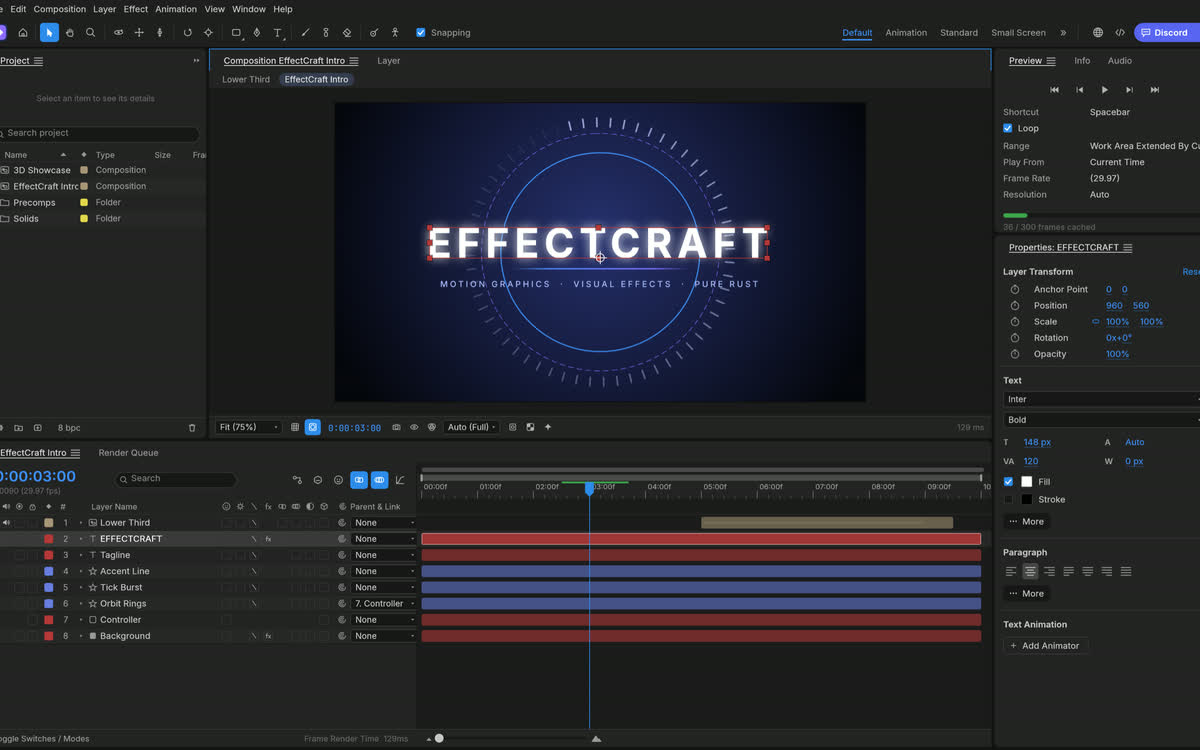
Layers can include solids, shapes, text, footage, nested compositions, adjustment layers, cameras, and lights. The timeline supports parenting, track mattes, blend modes, motion blur, time remapping, and markers. Keyframes include hold, Bezier, ease, and graph editing, giving you control over both what changes and how it moves.
Effects and compositing
The README groups effects across color correction, blurs, distortions, keying, noise, perspective, simulation, stylizing, and time. Masks and shape tools can narrow where an effect appears. Presence in the effects list does not guarantee a render identical to another editor, so compare a finished frame carefully.
3D and text layers
The project documents 3D layers, cameras with depth of field, several light types, and camera navigation views. Character and Paragraph controls support text layers and animation. Combining depth, blur, type, and effects can be demanding in a browser, so build a short test before scaling up.
Several delivery paths
The README lists a Render Queue with video, image-sequence, and audio outputs. It also describes Lottie import and export for web or app animation, with a report of constructs that Lottie cannot represent. Choose an output based on the destination and validate its timing, transparency, and audio there.
How do I edit and save a file?
- Open the web editor and create a small composition with a short duration and manageable dimensions. Add a solid, shape, or text layer so you can test the timeline without a large footage import.
- Set two keyframes on a property such as position or opacity. Play the composition, then change interpolation in the Graph Editor to see how the motion between the keys changes.
- Add one effect or mask and compare the affected and unaffected frame. If you nest a composition or add a camera, keep the project small enough that the browser can preview it smoothly.
- Render a short sample through the queue or a Lottie output where appropriate. Open that file in the intended player or app, then inspect frames, timing, transparency, and audio before sharing it.
Questions about using this editor
Can I use Get Artcraft for free without signing up?
Yes. All 12 editors are currently free to use, with no account, subscription or installation required. AI generation and paid third-party services are not included.
Where are my files saved?
Save or export your files to your own device. The editors process files in your browser, and this site does not provide cloud file storage. Some editors keep local recovery data; that is not a substitute for an exported copy.
Can I use the editors on a phone?
A desktop browser is recommended. Use a browser with WebAssembly and WebGPU or WebGL2 support, plus a keyboard and mouse. You can try opening an editor on a phone, but its controls and graphics may not work on your device.
Can this open an After Effects project?
The README for the pinned release says native .aep and .aepx projects cannot be opened and After Effects plug-ins do not run. EffectCraft uses its own .ecproj project file. Check later upstream releases separately rather than assuming they match this hosted version.
Can I export Lottie?
The upstream README documents built-in Lottie export and import. It also notes that export lists anything the format cannot represent. Test the animation in the actual target player because a composition may use effects or layers outside Lottie's model.
Are all effects production-ready?
No. The README distinguishes effects being present from full behavioral parity and says the rendering has not been automatically compared with After Effects. Use visible previews and exported files to check any effect critical to a delivery.
What are the current limits?
EffectCraft is alpha and is not presented by its developers as a replacement for After Effects on client work. The pinned README lists unavailable .aep/.aepx import and third-party plug-ins, behavior differences, and less-tested Windows and Linux interaction. Heavy compositions may strain the browser. Keep original footage, save project copies, and validate a representative output before depending on the result.



Desktop browser recommended. The editor downloads on first use; loading time depends on your connection and device.
Open EffectCraft