

Design & illustration
Alpha / v0.20.1CADCraft.
Free online CAD editor
Draw geometry, add dimensions and work with CAD files in your browser. Free with no account. Unsupported drawing entities may be lost on save; check a copy before using the output.
Desktop browser recommended. The editor downloads on first use; loading time depends on your connection and device.
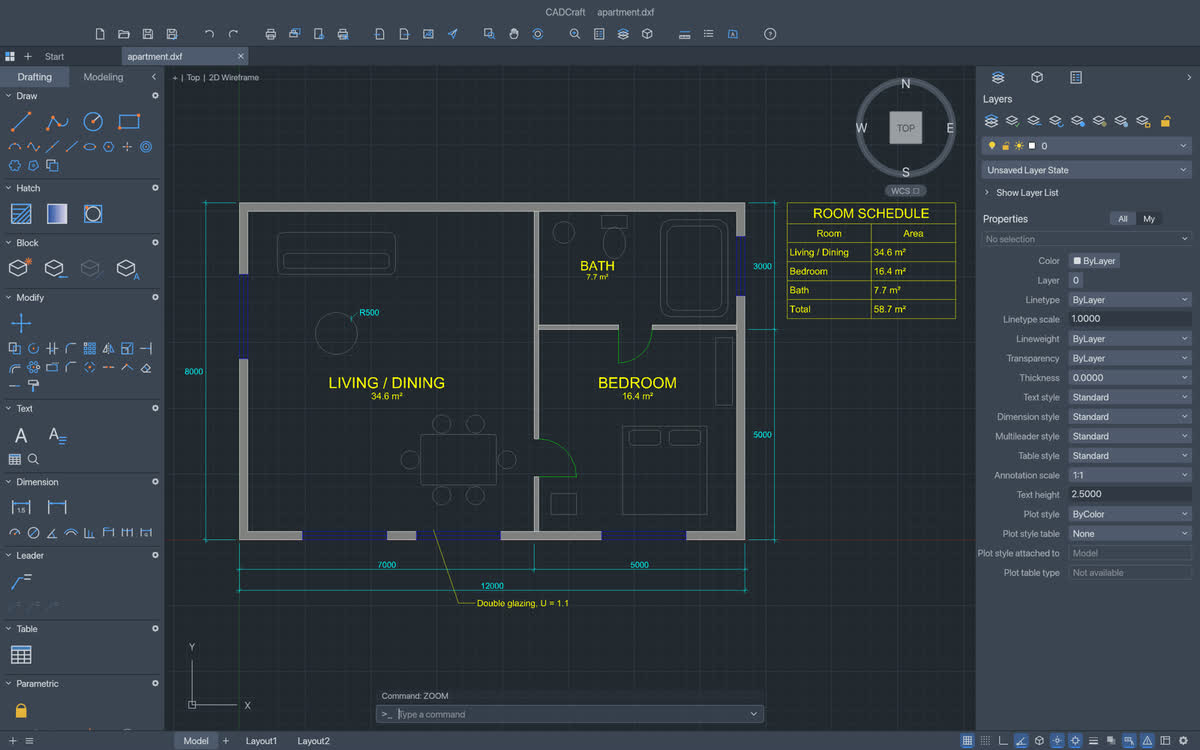
In your toolkit
- 01
Technical drawing
- 02
CAD workspace
- 03
Precision drafting
- Works with
- CAD / Drafting
- Web release
- v0.20.1 · Alpha
- Open in your browser
- Free to use. No account needed.
Before you start
Alpha. CAD interoperability and precision workflows are under development. Validate files before engineering use.
Save or export before closing the editor.
Release notes & downloadsLicense & attribution
The editors use MIT / Apache-2.0 licensing; bundled assets retain their own licenses. See the source, release and license files below.
What can I edit with this tool?
CADCraft — Free online CAD editor. Draw geometry, add dimensions and work with CAD files in your browser. Free with no account. Unsupported drawing entities may be lost on save; check a copy before using the output.
Technical drawings carry more meaning than their visible lines. Dimensions, blocks, hatches, layers, layout viewports, and file entities can all affect whether a drawing is useful to the next person. CADCraft is in early development; its README documents what works while warning that unmodeled entities may be lost when a file is saved. Always test a copy of an external drawing.
Which tasks does it support?
Command-led drawing
The README lists line, polyline, circle, arc, rectangle, spline, and text creation, along with move, copy, offset, trim, extend, fillet, and other modification commands. Its command line supports aliases, prompts, relative coordinates, and repeating the last action, which can make precise drafting faster than freehand placement.
Precision controls
Object snaps, polar tracking, ortho, grid snap, grips, and direct distance entry help place geometry intentionally. Dimensions can follow associated objects, and the application documents dimension styles, multileaders, tables, and text formatting. Review dimension values rather than relying only on the picture.
Drawing organization
Layers can be shown, frozen, locked, and styled. The README also covers blocks with attributes, hatch fills, parametric constraints, paper-space layouts, viewports, page setups, and plotting. These features help turn a model-space drawing into a structured sheet for review.
File exchange
The upstream project reads and writes DXF and uses an open-source library for DWG paths. It also documents PDF plotting and SVG and PNG export. A render or plot can look correct while the editable CAD file loses unsupported entities, so test both kinds of output when collaboration is involved.
How do I edit and save a file?
- Launch the browser editor and open a simple sample or a copy of a small DXF. Inspect the layer list and drawing units before changing geometry.
- Draw a line or circle through the command line, then use object snaps and direct distances to place a second object. Confirm the coordinates or dimension readout instead of estimating by eye.
- Use a layer or block to organize repeated geometry. Add a dimension or hatch, and if you need a sheet, place the model in a paper-space viewport with a deliberate scale.
- Save a new CAD file and export a PDF, SVG, or PNG as needed. Reopen the editable file, compare entity counts and dimensions with the source, and inspect the plotted sheet before engineering or fabrication use.
Questions about using this editor
Can I use Get Artcraft for free without signing up?
Yes. All 12 editors are currently free to use, with no account, subscription or installation required. AI generation and paid third-party services are not included.
Where are my files saved?
Save or export your files to your own device. The editors process files in your browser, and this site does not provide cloud file storage. Some editors keep local recovery data; that is not a substitute for an exported copy.
Can I use the editors on a phone?
A desktop browser is recommended. Use a browser with WebAssembly and WebGPU or WebGL2 support, plus a keyboard and mouse. You can try opening an editor on a phone, but its controls and graphics may not work on your device.
Can I open DWG and DXF?
The README documents native DXF paths and DWG access through acadrust. It also warns that CAD entities the application does not yet model are not retained on save. Work on a copy and compare the result in the originating CAD application.
Does it support layouts and plotting?
Yes, the upstream feature table includes paper-space layouts, scaled viewports, page setups, plotting, and PDF export. Inspect scale, units, lineweights, and text in a trial PDF before treating it as a finished drawing.
Is a browser drawing ready for engineering approval?
Not without independent validation. The README describes early development and points to file-format parity and gaps documentation. Check geometry, dimensions, unsupported entities, and the final plotted output using the standards required by your project.
What are the current limits?
CADCraft is in early development. The pinned README warns that entities it cannot model are not preserved when saving imported drawings. SHX fonts are not read directly, and text fallback depends on available fonts. DWG and DXF interchange, dimensions, and plot scale should be checked with real project files. Keep an untouched source and verify output in the target CAD environment before using it for design decisions, manufacturing, or construction.



Desktop browser recommended. The editor downloads on first use; loading time depends on your connection and device.
Open CADCraft