

Design & illustration
Alpha / v0.21.1DesignCraft.
Free online page layout editor
Arrange text and images across pages for a booklet or publication, then export the layout. Free with no account. Check fonts and page geometry before printing.
Desktop browser recommended. The editor downloads on first use; loading time depends on your connection and device.
In your toolkit
- 01
Page layouts
- 02
Text & image frames
- 03
Publishing workflows
- Works with
- PDF / Layout
- Web release
- v0.21.1 · Alpha
- Open in your browser
- Free to use. No account needed.
Before you start
Alpha. Check typography and exported documents carefully before print or professional delivery.
Save or export before closing the editor.
Release notes & downloadsLicense & attribution
The editors use MIT / Apache-2.0 licensing; bundled assets retain their own licenses. See the source, release and license files below.
What can I edit with this tool?
DesignCraft — Free online page layout editor. Arrange text and images across pages for a booklet or publication, then export the layout. Free with no account. Check fonts and page geometry before printing.
Page layout involves more than placing boxes. Stories can flow through linked frames, paragraph rules influence breaks, and a final PDF must preserve type and position. The README emphasizes its typography engine and documents several export formats. DesignCraft remains an actively developed project, so inspect a real export before treating the browser preview as print-ready evidence.
Which tasks does it support?
Page and frame structure
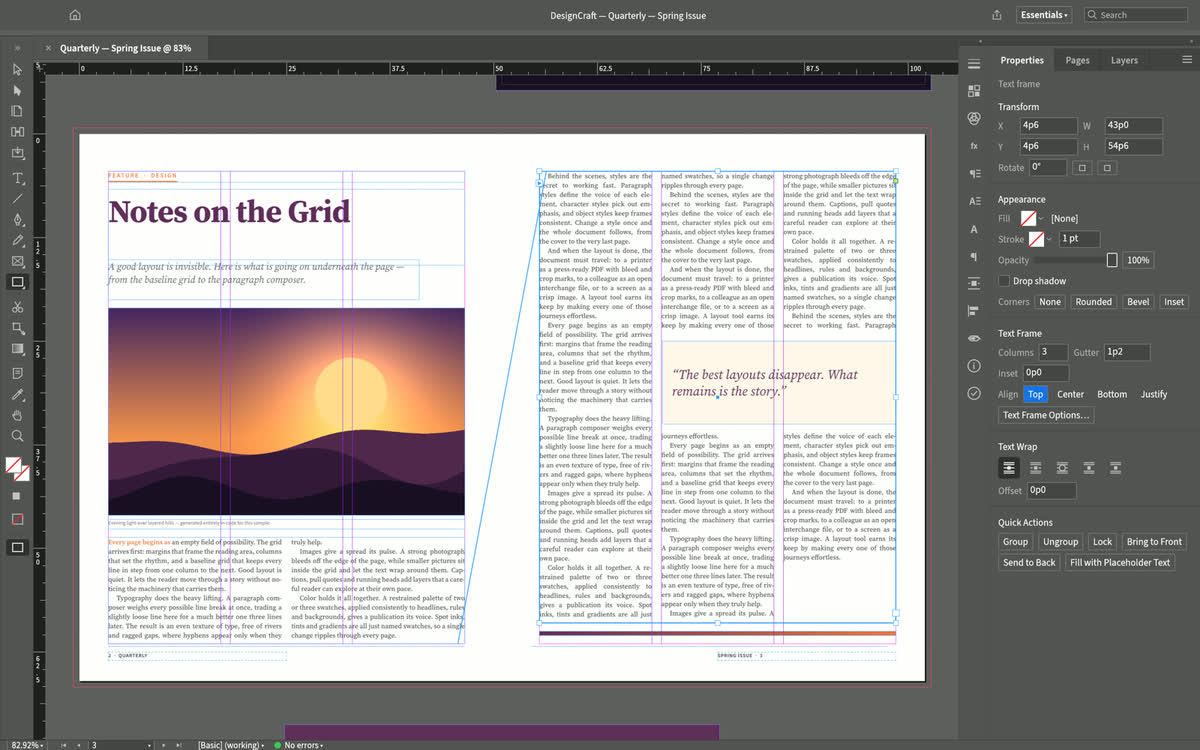
Spreads, parent pages, text and image frames, and threaded stories help manage repeated elements and text that continues across pages. The familiar Control panel, styles, swatches, and text wrapping let you build a publication as a document rather than as unrelated single-page pictures.
Detailed typography
The README describes paragraph composition, dictionary hyphenation, justification adjustments, keeps, optical margin alignment, columns, a baseline grid, tabs, rules, and shading. Those details matter when text must fit a page without awkward breaks. The project aims for consistent line breaks on screen and in PDF.
Open document exchange
A documented native format sits alongside IDML import and export, editable PowerPoint export, and PDF, PNG, and EPUB output. The README identifies PDF/X-4 and PDF/A-2b options. These formats serve different purposes, so select the one a printer or collaborator actually requests and test the exported file there.
Automation in the upstream project
The project routes menu actions and panel controls through commands that can also be driven by a control channel or MCP server. That can help with repeatable layout work in the wider application. This website hosts the browser release; it does not promise that its page exposes every desktop automation or font setup path.
How do I edit and save a file?
- Launch the web editor and examine the sample magazine or create a short new document. Decide on page size, margins, and the number of pages before placing long text.
- Set up a parent page or a repeated frame for shared elements. Place text in frames and link a story across pages when the copy needs to continue rather than stopping at one box.
- Apply paragraph and character styles, then add images and adjust text wrap. Check headings, hyphenation, overset text, and page breaks at both normal view and a closer zoom.
- Export a PDF or other required format and reopen it outside DesignCraft. Check every page, fonts, line breaks, image placement, and any printer requirements before sending a final document.
Questions about using this editor
Can I use Get Artcraft for free without signing up?
Yes. All 12 editors are currently free to use, with no account, subscription or installation required. AI generation and paid third-party services are not included.
Where are my files saved?
Save or export your files to your own device. The editors process files in your browser, and this site does not provide cloud file storage. Some editors keep local recovery data; that is not a substitute for an exported copy.
Can I use the editors on a phone?
A desktop browser is recommended. Use a browser with WebAssembly and WebGPU or WebGL2 support, plus a keyboard and mouse. You can try opening an editor on a phone, but its controls and graphics may not work on your device.
Can I import an InDesign interchange file?
The upstream README lists IDML import and export, but that does not mean every InDesign feature or external asset will survive unchanged. Open a copy, inspect page flow and style details, and compare an export with the source before trusting the result.
Which output is best for print?
The README documents PDF output including PDF/X-4, as well as PNG and EPUB for different destinations. A printer may have specific bleed, color, and font requirements. Confirm those separately and inspect the generated PDF; an on-screen layout alone is not a print proof.
Do fonts always appear the same in the browser?
Font availability depends on the build and environment. The README explains that Japanese text uses optional craft-fonts in development and that release builds include it. Verify any typeface important to your project in the exact hosted version and exported file.
What are the current limits?
DesignCraft is still under development. The README documents substantial layout and export capabilities, but it does not promise perfect IDML round trips or printer-ready output for every document. Fonts, linked assets, text overflow, complex styles, and exported page geometry need particular attention. The browser build can differ from a locally configured desktop build. Keep original material and review the final PDF or other export in the application that will receive it.



Desktop browser recommended. The editor downloads on first use; loading time depends on your connection and device.
Open DesignCraft