

Photo & image
Alpha / v0.23.1PhotoCraft.
Free online PSD and photo editor
Open a PSD or image, edit layers, masks and color, then save or export a copy. Free in your browser, with no account. Complex PSD compatibility varies.
Desktop browser recommended. The editor downloads on first use; loading time depends on your connection and device.
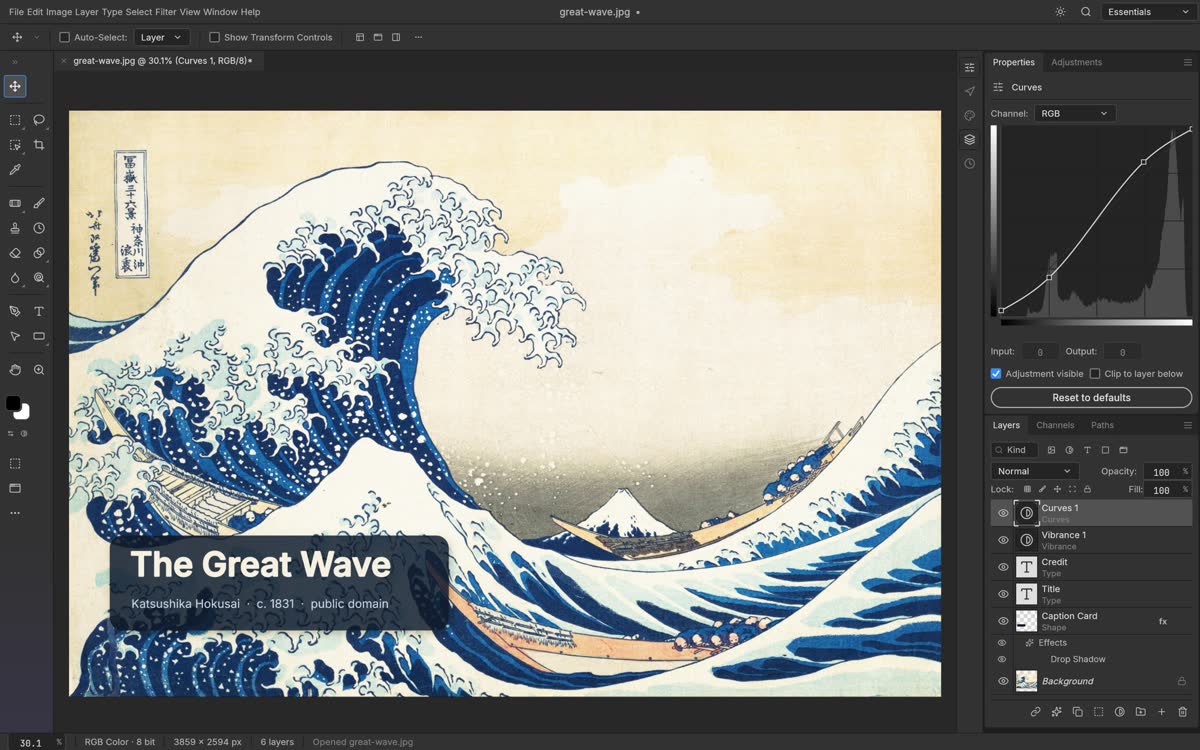
In your toolkit
- 01
Layers & masks
- 02
Brushes & adjustments
- 03
PSD import and export
- Works with
- PSD / PNG / JPG / WebP
- Web release
- v0.23.1 · Alpha
- Open in your browser
- Free to use. No account needed.
Before you start
Early alpha. Typography, advanced workflows, and plug-in compatibility remain incomplete. AI generation is not included.
Save or export before closing the editor.
Release notes & downloadsLicense & attribution
The editors use MIT / Apache-2.0 licensing; bundled assets retain their own licenses. See the source, release and license files below.
What can I edit with this tool?
PhotoCraft — Free online PSD and photo editor. Open a PSD or image, edit layers, masks and color, then save or export a copy. Free in your browser, with no account. Complex PSD compatibility varies.
The project is still described as early alpha. The README documents many desktop and automation capabilities, but this page links to a particular web release; a feature in newer source code is not automatically present in that release. Use the release link below to identify the exact build, and keep the source file while you experiment. PhotoCraft is a practical place to try an edit, not a reason to discard the original artwork.
Which tasks does it support?
Layered, reversible editing
Stack pixel, type, and shape layers, group them, and use clipping or pixel and vector masks to limit an edit. Adjustment layers such as Levels, Curves, Vibrance, and Hue/Saturation let you change the appearance without replacing the underlying pixels. You can compare a result by hiding or reordering a layer before saving.
Selection and painting tools
The README lists marquee and lasso tools, object-oriented selection options, brush and pencil tools, healing and clone tools, gradients, and many other controls. Brush settings include dynamics driven by pen input. These tools cover both a small local correction and a more involved painting or composite workflow.
PSD files and export
PhotoCraft has a dedicated PSD reader and writer. The upstream project tests layered round trips against real files and reports strong render preservation on its test collections, while acknowledging that a saved file is not byte-identical to the input. Test a copy of any important PSD, especially one with uncommon effects or resources, before using it in production.
The same engine beyond the interface
The upstream README also describes command, CLI, control-channel, and MCP access to editing actions. Those are properties of the wider project, not promises that every automation entry point is exposed by this hosted browser page. The web editor remains the simplest way to explore the visible editing controls here.
How do I edit and save a file?
- Open the hosted editor from this page. Let the web application finish loading, then inspect its menus and panels before opening a valuable file. If your browser or GPU cannot start the editor, use the linked release page to check other builds.
- Open a copy of an image or PSD and look at its layers. Add a separate adjustment or duplicate a layer before changing pixels so that you can compare the new version with the original composition.
- Make one focused change: create a selection, paint on a layer or mask, or adjust tone and color. Toggle the relevant layer or adjustment to judge whether the change helps, and check edges at a useful zoom level.
- Save or export the result to your device, then reopen it in the tool you expect to use next. Check the rendered appearance and editable structure separately; a visually correct composite does not guarantee every source-specific detail survived.
Questions about using this editor
Can I use Get Artcraft for free without signing up?
Yes. All 12 editors are currently free to use, with no account, subscription or installation required. AI generation and paid third-party services are not included.
Where are my files saved?
Save or export your files to your own device. The editors process files in your browser, and this site does not provide cloud file storage. Some editors keep local recovery data; that is not a substitute for an exported copy.
Can I use the editors on a phone?
A desktop browser is recommended. Use a browser with WebAssembly and WebGPU or WebGL2 support, plus a keyboard and mouse. You can try opening an editor on a phone, but its controls and graphics may not work on your device.
Can I work with a layered Photoshop document?
The README documents opening and saving real PSD and PSB documents and explains how the project tests preservation. Compatibility is broad but not a blanket guarantee for every file. Keep an untouched original, use a test copy, and verify the result in your target workflow.
Does this browser page include AI image generation?
No. The tool description and upstream project focus on editing controls such as layers, painting, adjustments, and file handling. Do not treat this hosted editor as a paid or cloud AI image generation service.
Where can I check a feature in detail?
Use the source and release links on this page. The README describes the wider project and the release identifies the hosted version. If a control is absent or behaves differently in your browser, report the version and a reproducible example upstream.
What are the current limits?
PhotoCraft is early alpha. Some type, advanced editing, and plugin workflows remain incomplete, and a complicated PSD may differ after a round trip. Browser resources and graphics support can also limit large documents. The upstream README's test results describe specific corpora, not universal compatibility. Save frequently, keep originals, inspect exported pixels and layers, and use the release notes when deciding whether this build fits a critical job.



Desktop browser recommended. The editor downloads on first use; loading time depends on your connection and device.
Open PhotoCraft