

Documents
Alpha / v0.22.0PdfCraft.
Free online PDF editor
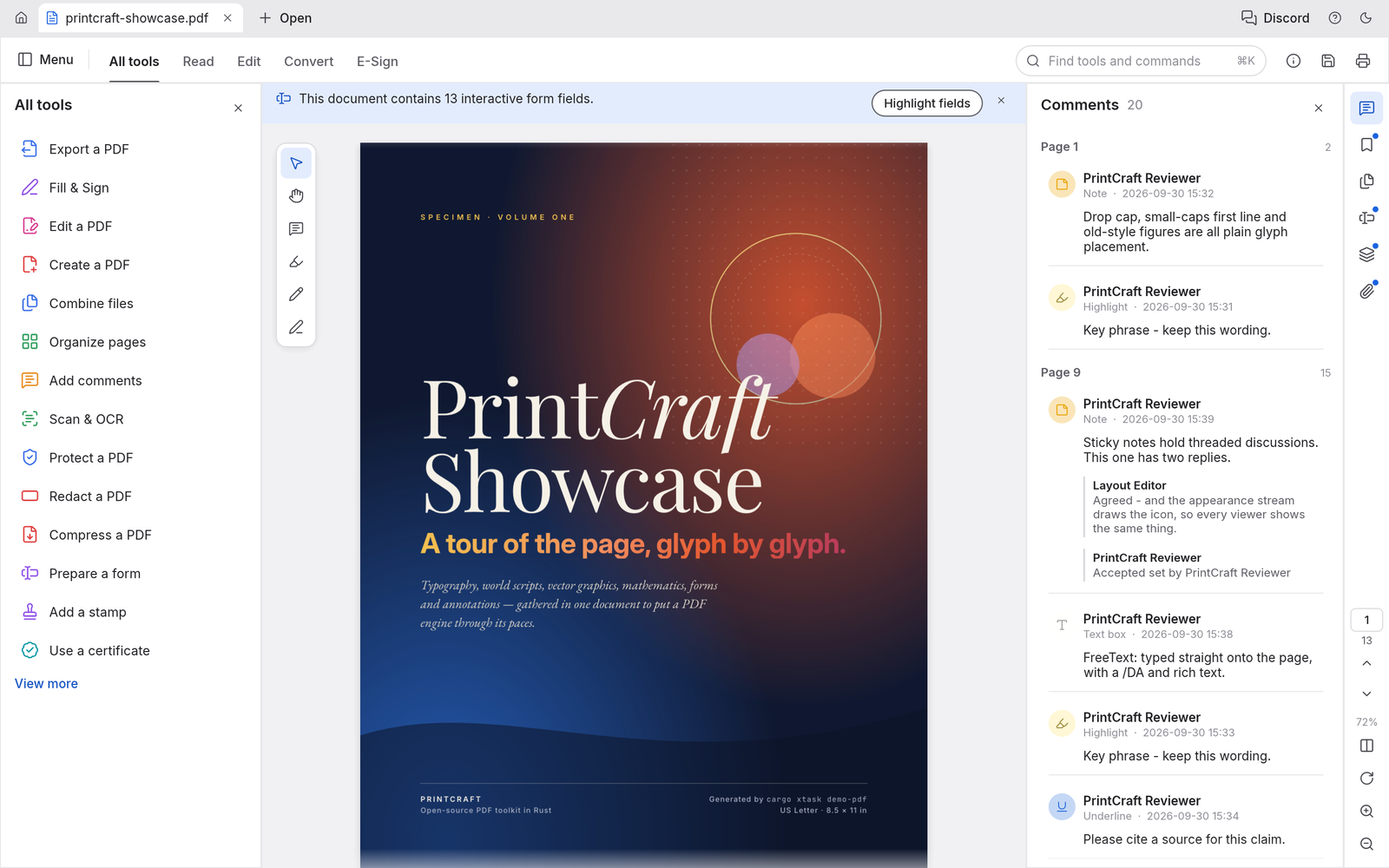
Open PDFs to annotate, fill forms, reorder pages or combine documents, then save a copy. Free with no account. Conversion and text editing have limits.
Desktop browser recommended. The editor downloads on first use; loading time depends on your connection and device.
In your toolkit
- 01
Read & annotate
- 02
Organize PDF pages
- 03
Fill document forms
- Works with
- Web release
- v0.22.0 · Alpha
- Open in your browser
- Free to use. No account needed.
Before you start
Alpha. Office conversion and text editing have limitations. Printing from the web build and advanced signatures are not fully supported.
Save or export before closing the editor.
Release notes & downloadsLicense & attribution
The editors use MIT / Apache-2.0 licensing; bundled assets retain their own licenses. See the source, release and license files below.
What can I edit with this tool?
PdfCraft — Free online PDF editor. Open PDFs to annotate, fill forms, reorder pages or combine documents, then save a copy. Free with no account. Conversion and text editing have limits.
A PDF can contain more than visible pages: links, bookmarks, form fields, layers, attachments, and security settings may matter just as much. PdfCraft's README pays attention to those details and to preserving original bytes through incremental saves. The project is nevertheless alpha, so a careful review after editing remains part of the workflow.
Which tasks does it support?
Reading and navigation
The README describes continuous, single-page, and two-page views, page rotation, a focused reading mode, bookmarks, thumbnails, search, and selection that follows reading order. It also discusses complex scripts, vertical text, transparency, and large pages. These controls help with a long report as well as a short form.
Page organization
The Organize pages view lets you select, rotate, delete, insert, and move pages, with undo available for the operation. The project also documents combining multiple PDFs, extracting selected pages, and splitting a document at chosen boundaries. Test the resulting page order and bookmarks before distributing a new file.
Forms, comments, and security
PdfCraft's README covers annotations, interactive forms, document layers, attachments, password protection, and permission handling. It explains that restrictions set by a document author are respected and that encrypted documents stay encrypted when saved. These are meaningful document properties to inspect, not just visual decorations.
Careful saves
The upstream project describes incremental and atomic saving and checks its output in CI. That approach is meant to avoid replacing original bytes unnecessarily. It does not eliminate the need to keep an independent original and verify a particular edited document in the viewer or recipient workflow you care about.
How do I edit and save a file?
- Start the browser editor and open a copy of a PDF. Read the page count, bookmarks, and any notice about restrictions before making a change.
- Use search or thumbnails to find the relevant page. For a page-order job, enter Organize pages and try a small move or rotation, then use undo if it is not right.
- For document assembly, combine files or extract the pages you actually need. If the file includes forms, comments, links, or attachments, inspect those elements after the operation rather than checking only page images.
- Save the result to your device and reopen it. Compare page count, readable text, form behavior, security settings, and attachments with the original. Keep the original file until the recipient has confirmed the output works.
Questions about using this editor
Can I use Get Artcraft for free without signing up?
Yes. All 12 editors are currently free to use, with no account, subscription or installation required. AI generation and paid third-party services are not included.
Where are my files saved?
Save or export your files to your own device. The editors process files in your browser, and this site does not provide cloud file storage. Some editors keep local recovery data; that is not a substitute for an exported copy.
Can I use the editors on a phone?
A desktop browser is recommended. Use a browser with WebAssembly and WebGPU or WebGL2 support, plus a keyboard and mouse. You can try opening an editor on a phone, but its controls and graphics may not work on your device.
Can it combine and split PDFs?
Yes, those workflows are described directly in the upstream README, including page extraction and splitting at selected boundaries. Always inspect the new document's page order and any dependent links or form fields before using it as the only copy. For a step-by-step walkthrough, see how to merge multiple PDF files.
Does a password-protected PDF always open?
The project implements PDF security handling and respects document permissions, but the README also names some protected documents among its alpha compatibility gaps. A particular file may still fail. Do not remove restrictions or rely on a successful visual preview alone.
Can this replace Office-to-PDF conversion?
Not generally. The upstream status notes weak conversion and sharing workflows, including missing Office-to-PDF support and limits in Word export. Use PdfCraft for the PDF operations it documents, and verify any exchange format separately.
What are the current limits?
PdfCraft is alpha. Its README says everyday reading and page organization are further along than conversion, sharing, and text-editing fidelity. Office-to-PDF conversion is missing, Word export can lose layout, and web-only platform features such as revealing a local file are unavailable. Advanced signatures and printing need version-specific checking. Keep an original and test output, especially when a PDF has forms, protection, unusual typography, or attached files.

Desktop browser recommended. The editor downloads on first use; loading time depends on your connection and device.
Open PdfCraft